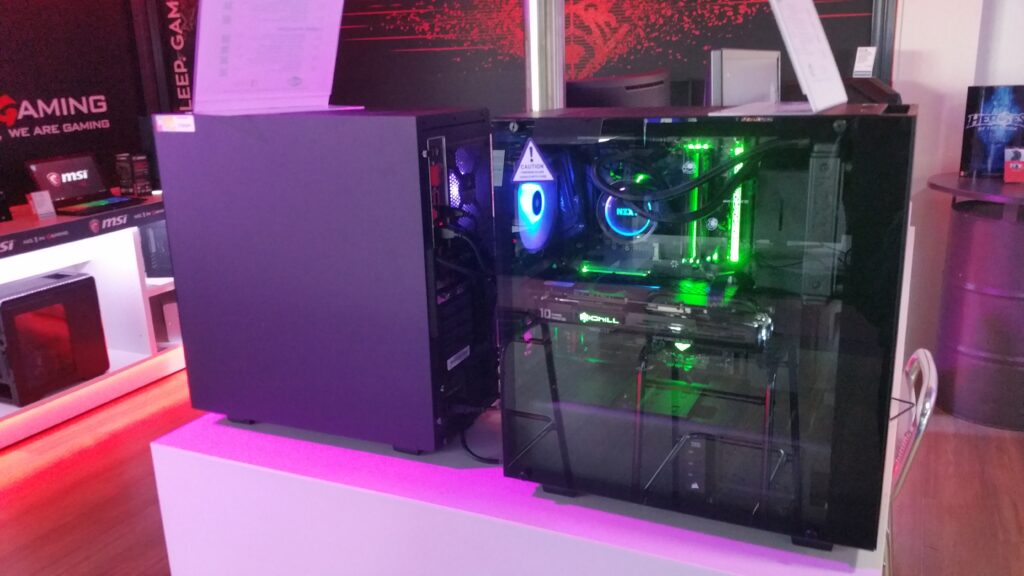

If you want a gaming PC that actually feels fast at 1080p without overspending, this $800-ish build hits the sweet spot. It’s balanced, easy to assemble, and uses parts that go on sale constantly—so you can stay near budget even when prices swing week to week.
This guide walks you through a best-value under-$800 gaming PC build (Ryzen 5 5600 + Radeon RX 7600), plus an NVIDIA alternative and an Intel option if you find a killer bundle. You’ll also get a quick compatibility checklist, buying tips, and the best upgrades to prioritize later.
Assumptions (so the budget stays honest):
- Use case: 1080p High / 1440p Medium gaming + general use
- Region: US pricing (verify local availability)
- Not included: Windows license (or Linux), monitor/keyboard/mouse/headset
- Reality check: PC part pricing changes weekly—treat totals as targets
The best value under $800 build (AM4 + RX 7600)
This is the build I recommend for most people shopping the sub-$800 range in 2026: Ryzen 5 5600 + RX 7600 on a B550 motherboard with 16GB DDR4 and a 1TB NVMe SSD.
Why this build works
- Excellent 1080p performance per dollar. It’s strong for esports titles and handles most modern AAA games comfortably at 1080p High.
- Affordable, mature platform. AM4 + DDR4 is widely available and usually cheaper than newer platforms, which matters at this budget.
- Practical upgrades later. You can drop in a Ryzen 7 5700X for productivity or a 5800X3D for a big gaming uplift later (if pricing makes sense).
- Reasonable power draw. A quality 650W PSU is more than enough for stability and future GPU upgrades in the midrange.
Parts list (with target prices)
Below is a “typical sale price” parts list. If you’re building today, it’s normal for one or two parts to be above target—your goal is to keep the total near $800 by shopping deals.
Estimated total: ~$785 typical
- Low sale scenario: ~$745
- High scenario: ~$870 (usually driven by GPU pricing or premium motherboard features)
Quick table: recommended $800 build
| Category | Recommended part | Target price (USD) | Notes |
|---|---|---|---|
| CPU | AMD Ryzen 5 5600 (6C/12T) | $130 | Often includes a stock cooler; great value |
| GPU | AMD Radeon RX 7600 8GB | $300 | Strong 1080p; 1440p requires settings tuning |
| Motherboard | B550 mATX (e.g., MSI PRO B550M-VC WiFi tier) | $110 | DDR4, M.2 NVMe, BIOS usually ready for Ryzen 5000 |
| RAM | 16GB (2×8GB) DDR4-3200 CL16 or 3600 CL18 | $45 | Dual-channel kit; enable XMP/DOCP |
| Storage | 1TB NVMe SSD (PCIe 4.0 recommended) | $70 | WD SN770 / Crucial P3 Plus tier is common value |
| PSU | 650W 80+ Bronze/Gold (reputable line) | $70 | Don’t cheap out here; look for warranty 5+ years |
| Case | Airflow case w/ 2–3 fans included | $60 | Check GPU length clearance; add a fan if needed |
Part-by-part breakdown (what to buy and what to avoid)
CPU: AMD Ryzen 5 5600 (6 cores / 12 threads)
Target price: ~$120–$150 (typical ~$130)
The Ryzen 5 5600 is a classic budget gaming CPU: fast enough to keep an RX 7600 fed at 1080p, and still solid for everyday multitasking.
Compatibility notes:
- Socket: AM4
- Works great with B550 boards
- Often includes a stock cooler (verify the listing)
Alternatives:
- Ryzen 5 5600X (only if it’s within ~$10–$20)
- Ryzen 5 5600GT (only if you specifically want an iGPU for troubleshooting—gaming performance with a discrete GPU is usually not better)
My practical take: if your room is hot or you’re sensitive to fan noise, consider a $20–$35 tower cooler later. But the stock cooler is fine to start.
GPU: AMD Radeon RX 7600 8GB
Target price: ~$270–$330 (typical ~$300)
This is the performance anchor of the build. At 1080p, the RX 7600 usually offers excellent rasterized performance for the money.
Compatibility notes:
- Needs PCIe x16 slot (standard)
- Many models use 1× 8-pin PCIe power (check your exact card)
- Runs on PCIe 4.0 with B550 (and still works fine in PCIe 3.0)
What to expect in real use:
- 1080p High: target experience for most modern games
- 1440p Medium: viable with settings tuning
- 8GB VRAM: great at 1080p; at 1440p in newer titles you may need to reduce texture settings
Alternatives:
- NVIDIA RTX 4060 8GB: often pricier, but has strong RT/DLSS/Frame Gen ecosystem
- Used RTX 3060 Ti / RX 6700 XT: can be phenomenal value if you can verify condition and get a return window
Motherboard: B550 mATX board (DDR4)
Target price: ~$100–$140 (typical ~$110)
You don’t need an expensive motherboard for this build—but you do want one with the basics done right.
What to look for:
- AM4 + Ryzen 5000 support (most B550 boards ship ready now)
- DDR4 (keeps costs down)
- At least 1× M.2 NVMe slot (PCIe 4.0 preferred for the primary slot)
- Wi‑Fi: optional (nice to have, but not mandatory)
Important note: If you’re buying older stock or used, confirm the BIOS supports Ryzen 5000 out of the box. Most do, but it’s worth checking the product page or box label.
RAM: 16GB (2×8GB) DDR4-3200 CL16 or DDR4-3600 CL18
Target price: ~$35–$60 (typical ~$45)
For gaming on a budget, 16GB is still the value baseline. The key is buying a 2-stick kit so you get dual-channel performance.
Setup tip (easy performance win):
- After your first boot, enable XMP/DOCP in BIOS so the RAM runs at its rated speed.
Upgrade option:
- 32GB (2×16GB) if you run heavy mods (Skyrim, Cities: Skylines, etc.), keep lots of apps open, or want extra headroom for the next few years (+$30–$60 typically).
Storage: 1TB NVMe SSD (PCIe 4.0 recommended)
Target price: ~$60–$100 (typical ~$70)
A 1TB NVMe SSD gives you a snappy OS and enough room for a handful of big games.
Compatibility notes:
- M.2 2280 NVMe drive
- Install in the primary M.2 slot (often the top slot) for best performance
Alternatives:
- 2TB NVMe if you keep lots of AAA titles installed (+$40–$80)
- Add a cheap 2TB SATA HDD later for bulk storage
Power supply: 650W from a reputable line (80+ Bronze/Gold)
Target price: ~$60–$100 (typical ~$70)
The PSU is where “budget” can become “regret.” A stable power supply protects your parts and prevents random crashes under load.
What to look for:
- 650W capacity
- Known-good series (examples: Corsair CX/RM, Seasonic Focus, EVGA G-series, be quiet!, Thermaltake Toughpower GF)
- Warranty 5+ years if possible
Connector checklist:
- 24-pin ATX
- 8-pin CPU EPS
- At least one 8-pin PCIe for the RX 7600
Avoid: no-name PSUs with vague specs. If the listing feels sketchy, it is.
Case: airflow-focused with 2–3 fans included
Target price: ~$50–$90 (typical ~$60)
Look for a case with a mesh front panel and at least two fans. At this budget, cooling and noise depend more on airflow than aesthetics.
Compatibility notes:
- Supports mATX motherboard (most ATX cases do)
- Check GPU length clearance: RX 7600 cards are often ~250–300mm depending on model
Tip: If your case only includes one fan, add a $10–$20 120mm intake fan. It’s one of the cheapest ways to improve temps.
Expected gaming performance (what you should realistically expect)
With a Ryzen 5 5600 and RX 7600, the goal isn’t “max everything forever”—it’s smooth, high-quality 1080p and a build that can scale with upgrades.
- 1080p High: great target for most games
- 1440p Medium: doable, especially if you tune textures and a couple of heavy settings
- Ray tracing-heavy titles: the RTX 4060 may feel smoother thanks to NVIDIA’s DLSS/Frame Gen features, but the better choice depends heavily on real-world pricing that week
If you only take one lesson from budget builds: GPU price is the swing factor. If the RX 7600 is $270 and the RTX 4060 is $360, the value equation changes fast.
Alternative builds under $800
Option A: NVIDIA-focused under $800 (AM4 + RTX 4060)
Pick this if you care more about NVIDIA’s feature stack than raw raster value.
When to choose it:
- You want DLSS / Frame Generation support
- You play a lot of ray-tracing heavy games
- You stream and prefer NVIDIA’s ecosystem (NVENC is a common reason)
What changes:
- Swap RX 7600 8GB → RTX 4060 8GB
- Budget impact: +$0 to +$80 depending on deals
Tip: If RTX 4060 pricing is high, a used RTX 3060 Ti (or even a used 3070, if priced right) can be a better performance-per-dollar buy—just make sure you have a return window and can test it.
Option B: Intel value build (LGA1700 + DDR4)
This path makes sense when you find a strong CPU + motherboard bundle—especially from Micro Center.
Core parts:
- CPU: Intel Core i5-12400F
- Motherboard: B660/B760 DDR4
- GPU: RX 7600 8GB or RTX 4060 8GB
Compatibility notes:
- The 12400F has no iGPU → you must have a discrete GPU for display output
- Choose DDR4 boards to stay within budget (DDR5 usually pushes you closer to or over $800)
Compatibility checklist (don’t skip this)
Use this quick checklist before you click “Buy.” It prevents 90% of first-time builder headaches.
CPU / motherboard
- ✅ CPU socket matches motherboard: AM4 for Ryzen 5 5600
- ✅ BIOS supports the CPU (especially if buying older B550 stock)
RAM
- ✅ RAM generation matches board: DDR4 vs DDR5 (this build uses DDR4)
- ✅ Buy 2 sticks for dual-channel
Case / motherboard
- ✅ Motherboard form factor fits case: mATX board fits in mATX and most ATX cases
PSU / connectors
- ✅ PSU has 24-pin ATX and 8-pin EPS for CPU
- ✅ PSU has required GPU PCIe 8-pin
GPU clearance
- ✅ Case supports your GPU length (check the case spec page)
Storage
- ✅ Motherboard has an M.2 slot for NVMe
- ✅ SSD is M.2 NVMe (not M.2 SATA unless the board supports it specifically)
Where to buy parts (new vs used)
Best places for new parts
- Micro Center: best for CPU + motherboard bundles (often in-store pickup)
- Newegg: frequent GPU/board deals; watch for marketplace sellers and return policies
- Amazon: convenient returns; confirm the seller is reputable
- Best Buy: occasional GPU/SSD sales; easy local returns
- B&H: sometimes strong pricing for storage/cases; check shipping
Used parts (how to do it safely)
- eBay: often best for used GPUs—buy from high-feedback sellers and check return window
- Facebook Marketplace: great local deals—test before paying if possible
Used GPU sanity check (quick):
- Inspect the card for corrosion/damage
- Verify fans spin smoothly
- Run a short stress test and a couple of games
- Watch temperatures and stability
Best upgrades to plan for (spend smarter later)
If you’re building under $800, the best strategy is: hit the performance baseline now, then upgrade the parts that matter most for your specific games.
High-impact upgrades
- 32GB RAM (2×16GB)
Worth it if you mod games, multitask heavily, or want extra headroom. - 2TB NVMe SSD
If you juggle multiple 100GB+ games, this is a quality-of-life upgrade you’ll feel immediately. - CPU upgrade (AM4)
Ryzen 7 5700X: better for productivity/streaming
Ryzen 7 5800X3D: often one of the best “drop-in gaming upgrades” for AM4, if priced reasonably - Aftermarket CPU cooler (optional)
Not mandatory for performance, but great for noise and temps if the stock cooler bothers you.
Quick build tips (first-time friendly)
- Build on a table, not carpet. Keep screws organized.
- Update Windows/Linux after first boot before benchmarking—drivers matter.
- Enable XMP/DOCP for your RAM in BIOS.
- Install GPU drivers directly from AMD/NVIDIA’s official site.
- If something won’t boot: reseat RAM, then GPU power, then check the front-panel connectors. Those are the usual culprits.
Conclusion: the smartest $800 gaming PC build right now
A budget gaming PC build under $800 is all about balance. The Ryzen 5 5600 + RX 7600 combo nails that balance for 1080p gaming, keeps the platform affordable with AM4/DDR4, and leaves you a clear upgrade path (more RAM, bigger SSD, or a later CPU drop-in like the 5800X3D).
If you want the smoothest experience in ray tracing-heavy games and love DLSS/Frame Gen, swap in an RTX 4060 when pricing makes sense. Otherwise, ride the best-value build, shop sales, and upgrade strategically.
Next step: price-check the GPU first, then build the rest of the cart around it to stay under budget.