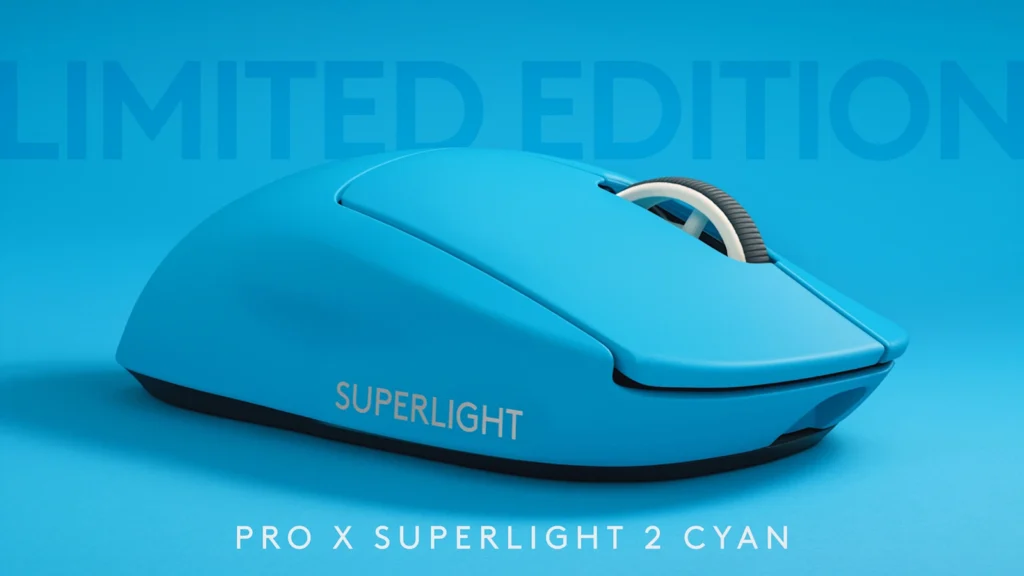

If you’ve ever bought a mouse because pros use it, the Logitech G Pro X Superlight 2 is the modern version of that idea—but with a few quality-of-life fixes that actually matter. The big question isn’t whether it’s good (it is). It’s whether the changes are meaningful enough to justify the price—especially if you already own the original Superlight.
Primary keyword: Logitech G Pro X Superlight 2 review
Quick verdict: should you upgrade from Superlight 1?
Buy the Superlight 2 if you’re:
- Buying fresh (coming from an older wireless mouse, a wired FPS staple, or anything mid-tier): it’s one of the safest “no-regrets” esports FPS mice you can buy in 2026.
- Annoyed by micro‑USB and want USB‑C, plus better battery behavior and newer switches.
- The type of competitive player who actually tinkers with settings and wants to try 2K/4K/8K polling (and is willing to deal with potential battery/CPU tradeoffs).
Keep the original Superlight (Superlight 1) if you’re:
- Already happy at 1000 Hz and love your current click feel. The performance gains are incremental in real gameplay.
- Getting the Superlight 1 for a much lower price and just want the shape + LIGHTSPEED reliability.
My take: the Superlight 2 is a better product, but it’s not a mandatory upgrade. It’s a “nice to have” refresh unless USB‑C, switch feel, or high polling rate are pain points you care about.
What’s new vs the original Pro X Superlight (Superlight 1)
Here’s the upgrade story in one table. (Exact bundle contents and regional SKUs can vary—double-check the Logitech listing for your region.)
| Feature | Superlight 1 | Superlight 2 | What it means |
|---|---|---|---|
| Weight | ~63g advertised | ~60g advertised | Small change, but every gram matters for low-sens flicks and long scrims |
| Charging | micro‑USB | USB‑C | The most practical upgrade—better cable ecosystem + easier charging |
| Battery rating | ~70h commonly cited | Up to ~95h commonly cited | Real-world depends heavily on polling rate and sleep settings |
| Sensor | HERO (previous gen) | HERO 2 sensor | More headroom; in practice you’re buying consistency, not “more DPI” |
| Switches | Mechanical | LIGHTFORCE switches (hybrid optical-mechanical) | Different click feel; generally aims for consistency and lower latency |
| Max wireless polling | 1000 Hz | Up to 8000 Hz (LIGHTSPEED 8000 Hz) | Niche benefit; can be great if your setup is stable and you’re sensitive to input |
| Connectivity | LIGHTSPEED 2.4 GHz | LIGHTSPEED 2.4 GHz | Still no Bluetooth on the Superlight line (gaming-first design) |
If you’re comparing G Pro X Superlight 2 vs Superlight, the headline improvements are USB‑C, updated sensor/switches, and higher polling options. The shape philosophy stays the same.
Design, shape, and comfort (why pros still pick “the safe shape”)
The reason the Superlight series keeps showing up on stage isn’t because it has the most features—it’s because the shape is safe. Not exciting. Not risky. Just dependable across lots of hands and grip styles.
Shape and grip styles
- Claw grip: Excellent. The rear hump and side curvature support a stable claw without forcing your hand.
- Fingertip: Also great, especially if you like a light mouse for micro-corrections.
- Palm: Depends on hand size and preference. If you have larger hands or like a taller hump that fills the palm, you may prefer an ergonomic shape (see alternatives below).
Coating and long-session comfort
Logitech’s coating tends to sit in that “controlled” middle ground: not super rubberized, not overly slick. In long Valorant or CS2 sessions, that matters more than you’d think—a consistent grip reduces tension, and reduced tension improves aim endurance.
Minimal buttons (on purpose)
This is an esports FPS mouse, not a productivity or MMO mouse. You get the essentials—main clicks, scroll click, and two side buttons. That’s it. For tac shooters, that simplicity is a feature.
Scroll wheel
The wheel is functional and tactile—good for weapon swap and jump-binds—but it’s not a premium “free-spin” wheel. If you want a mouse that feels like a productivity tool first, you’re shopping in the wrong aisle.
Sensor + performance: HERO 2, DPI, tracking, and real-world aim feel
Logitech markets the HERO 2 sensor with big numbers (max DPI figures vary by listing and firmware reporting—often quoted up to 44K). Here’s the reality: you’re not buying this mouse for extreme DPI.
What you are buying is:
- Consistent tracking during fast flicks and resets
- Reliable lift-off behavior for low-sens players (especially in CS2/Valorant)
- Low-latency wireless performance that feels “wired”
Practical DPI advice for FPS
Most competitive FPS players live in a boring range because it works:
- 400–800 DPI (classic low DPI)
- 800–1600 DPI (common modern range with matching in-game sensitivity)
Higher DPI isn’t automatically “better.” The win is consistency + comfort—you want a sensitivity that keeps your arm and wrist relaxed.
Surface compatibility
Like most esports sensors, it’s designed for a mousepad. Don’t expect perfect tracking on glass or weird glossy surfaces. Pair it with a good cloth or hybrid pad and you’ll get the intended performance.
Polling rate: 1000 Hz vs 2000/4000/8000 Hz—what you actually get
Polling rate is one of the most overhyped topics in mouse marketing, so let’s make it simple.
What polling rate means (in plain English)
Polling rate is how often your mouse reports its position to your PC.
- 1000 Hz = 1000 reports/second
- 8000 Hz = 8000 reports/second
In theory, higher polling can reduce input latency and make micro-adjustments feel smoother—especially on high refresh rate monitors. In practice, the benefits can be subtle, and the downsides can be real.
The tradeoffs (the stuff people skip in reviews)
- Battery drain: High polling can noticeably reduce battery life. If you’re the type who forgets to charge, 8K might be more annoying than helpful.
- CPU overhead and stability: Some systems/games handle 4K/8K perfectly. Others can stutter, show inconsistent frametimes, or just feel “off.”
- Diminishing returns: Going from 125 → 1000 Hz is a clear jump. 1000 → 2000 can be noticeable for some players. 2000 → 8000 is where it becomes personal sensitivity + system quality.
Best-practice recommendation
If you’re experimenting with an 8K polling rate mouse, do it like this:
- Start at 1000 Hz (baseline).
- Try 2000 Hz for a week.
- Move to 4000 Hz if everything remains stable.
- Only use 8000 Hz if your PC is solid and you can actually feel the difference.
Receiver/bundle nuance (important)
Superlight 2 can support LIGHTSPEED 8000 Hz, but the included receiver can vary by bundle/region/SKU. Some versions include the 8K-capable receiver; others may require a specific receiver/firmware. Check the exact SKU listing before you buy.
Clicks & switches: LIGHTFORCE feel, speed, and noise
The Superlight 2’s biggest “feel” change is LIGHTFORCE switches. Logitech positions these as hybrid optical-mechanical for faster actuation and better consistency.
What it feels like
This is subjective, but here’s the pattern many players notice when moving between switch types:
- Crisper, snappier actuation (good for tap-firing and controlled bursts)
- Potentially louder / sharper sound signature than some traditional mechanical clicks
- A more “immediate” return that can feel great in tac shooters
Why this matters in FPS
In Valorant and CS2, you’re often doing repeated micro-clicks: short bursts, tap shots, and tiny corrections. The click feel affects:
- Finger fatigue over long sessions
- How confident you are in tap timing
- Whether you accidentally “ride” the click and mess up recoil rhythm
About double-click issues
Optical or hybrid approaches are generally used to reduce debounce-related problems seen in some mechanical designs, but it’s not a magic shield against every failure mode. Consider this a durability/consistency lean, not a guarantee.
Battery life, charging, and Powerplay
On paper, Superlight 2 is often quoted at up to ~95 hours at standard settings. Real-world battery depends on:
- Your polling rate (1K vs 2K vs 8K is a big swing)
- Sleep timers
- How often you play
USB‑C is the real daily upgrade
If you’ve lived with micro‑USB on the original, you already know the vibe: wrong cable, loose feel, “why is this still here?” Superlight 2 fixes that. Also, you can play while charging, which makes it easy to treat battery as a non-issue.
Powerplay compatibility
If you’re already in the Logitech ecosystem, Powerplay can be the best quality-of-life upgrade: you stop thinking about charging entirely. Compatibility can vary by model/SKU, so confirm on Logitech’s product page for your specific version.
Practical battery tips
- Create an onboard profile in Logitech G HUB so settings stay consistent.
- Keep Windows USB power settings sane (avoid aggressive power saving).
- If you don’t need it, run 1000–2000 Hz and enjoy longer battery.
Feet/skates, glide, and build quality
The Superlight line’s identity is “fast and effortless,” and the stock PTFE skates are a big part of that.
Stock glide
On a decent cloth pad, the glide is smooth and predictable. If you’re coming from heavier mice or rougher skates, the first hour can feel almost too quick—then your muscle memory adjusts and it starts to feel normal.
Aftermarket skates: do you need them?
Not immediately. Aftermarket skates can change speed and control feel, but the stock experience is already tournament-ready. Upgrade skates when:
- Your stock feet wear down
- You want a specific glide profile (more speed or more control)
Build quality notes
At this price, you want:
- No creaking
- Minimal side flex
- Clean button tension without wobble
Most units are solid, but always test early during your return window—especially main clicks and side buttons.
Superlight 2 vs Superlight 1: comparison checklist (buyer decision matrix)
Use this as a fast “should I buy” filter.
Choose Superlight 2 if…
- You want USB‑C charging (and you’re done with micro‑USB).
- You care about battery life and don’t want to charge as often.
- You want to try 2K/4K/8K polling and your PC can handle it.
- You prefer the feel/consistency goals of LIGHTFORCE switches.
- Pricing is close and you’re buying new anyway (this is the easiest decision).
Keep Superlight 1 if…
- You already own it and you’re happy at 1000 Hz.
- You like the original click feel more.
- Superlight 1 is significantly discounted and you want maximum value.
The most honest answer to “is the G Pro X Superlight 2 worth it?”
If you’re buying your first “endgame” FPS mouse: yes, it’s worth it—because it’s hard to dislike, and it performs at a level you won’t outgrow.
If you already own Superlight 1: it’s only “worth it” if the specific upgrades (USB‑C, switches, high polling) fix real annoyances for you.
Alternatives (and when to pick them instead)
Superlight 2 is the safe symmetric pick, but it’s not the only path to great aim. Consider these if you know what you want.
- Razer Viper V3 Pro – if you want top-tier wireless performance with a different shape philosophy and Razer’s ecosystem.
- Pulsar X2V2 / X2H – if you want a lighter, aggressive shape option and more variety in hump profiles.
- VAXEE / ZOWIE wireless options – if you prioritize “pure FPS feel” and shape-first tuning (often at the expense of flashy specs).
- Finalmouse (varies by drop) – if you want extremely low weight and don’t mind availability quirks.
- Logitech Pro X Superlight 2 DEX – if you like Logitech reliability but want an ergonomic (right-hand) feel instead of symmetric.
More reading on GamesHarbour:
- Latest reviews
- Guides (settings, gear, and performance)
- Valorant Challengers SEA 2026: format + what’s next
FAQ
Is the Logitech G Pro X Superlight 2 worth it?
For competitive FPS players who want a lightweight, proven shape with top-tier wireless, yes—especially if you’re upgrading from older or heavier mice. The value is less obvious if you already own Superlight 1 and don’t care about USB‑C or high polling.
Is it worth upgrading from the original G Pro X Superlight?
Upgrade if you want USB‑C, newer switch feel, and to experiment with 2K/4K/8K polling. Skip if you’re happy at 1K and your Superlight 1 already feels perfect.
What’s the difference between Superlight and Superlight 2?
The Superlight 2 adds USB‑C charging, updated HERO 2 sensor, LIGHTFORCE switches, and support for higher wireless polling rates (up to 8K depending on receiver/support). The shape remains broadly the “safe” Superlight profile.
Do you actually need 8000 Hz polling rate for FPS?
No. Most players can compete at the highest level on 1000 Hz. Higher polling is for enthusiasts with stable PCs, high refresh monitors, and the sensitivity to feel small input differences.
How long does the Superlight 2 battery last?
It’s often cited at up to ~95 hours at standard settings, but it can drop notably at higher polling rates. Treat the number as a best-case rating, not a guarantee.
Does the Superlight 2 have Bluetooth?
No—Superlight 2 is designed around LIGHTSPEED 2.4 GHz (receiver-based) for gaming latency, not Bluetooth multi-device convenience.
Is Superlight 2 good for Valorant / CS2?
Yes. The lightweight build, stable wireless, and safe shape make it an excellent esports FPS mouse. If you want “the mouse that won’t fight you,” it’s one of the best options.
Recommended settings (quick box)
- DPI: 800 (or 400 if that’s your preference)
- Polling rate: 1000 Hz (start), then 2000 Hz if stable; 4000/8000 only if you can feel it
- Windows pointer speed: 6/11
- Enhance pointer precision: Off
- Angle snapping: Off
- LOD: Default/low (set via G HUB if available)
Conclusion: the Superlight 2 is a refinement, not a reinvention
This Logitech G Pro X Superlight 2 review boils down to a simple truth: Logitech took one of the most universally liked FPS mouse shapes and made it easier to live with (USB‑C), more modern on paper (HERO 2, LIGHTFORCE), and more flexible for enthusiasts (up to 8K polling rate with the right receiver/support).
If you’re buying your next main mouse for Valorant, CS2, or Apex, it’s a top-tier choice. If you’re sitting on a perfectly fine Superlight 1, you can safely wait for a big discount—unless the USB‑C and switch feel upgrades solve real frustrations for you.
Sources (for editor verification)
- Logitech G official product page (images/specs): PRO X SUPERLIGHT 2 (Limited Edition Cyan)
- RTINGS (performance/latency measurements): https://www.rtings.com/mouse/reviews/logitech/g-pro-x-superlight-2
- Tom’s Hardware review (qualitative impressions): https://www.tomshardware.com/reviews/logitech-g-pro-x-superlight-2
Featured image credit: Logitech G (product page gallery asset, accessed 2026-03-11). Source: logitechg.com